Free website blocker for Chrome · Hedgerow
Block the sites that pull you away.
You sit down to work and end up on YouTube again. Hedgerow blocks the sites you choose during a focus session, on a weekly schedule, or all the time. It is free, needs no account, and keeps your list in your browser.
Free · No account
Available on the Chrome Web Store
Add to Chrome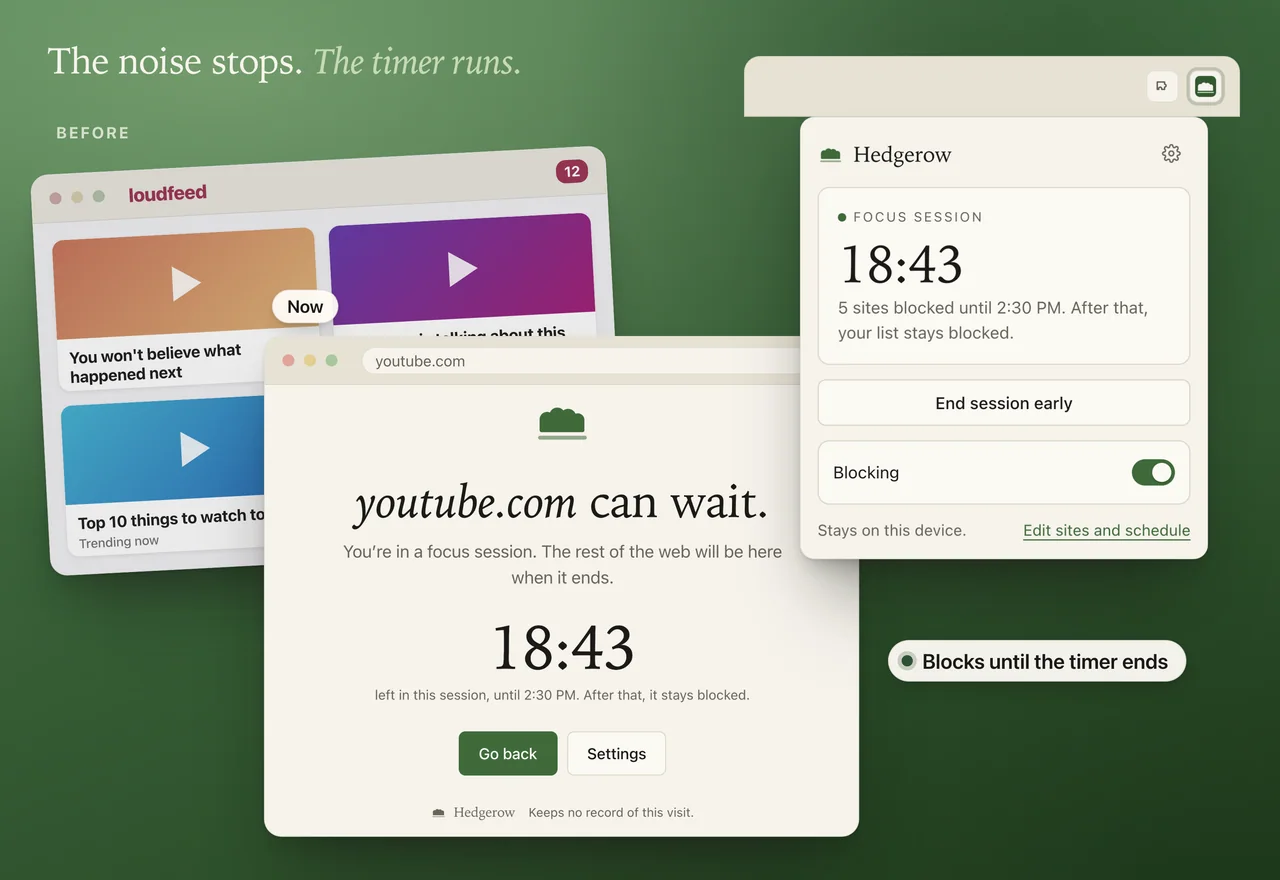
01
How blocking works
- Focus sessionsStart 25, 50 or 90 minutes (or your own length) from the toolbar or with Alt+Shift+F. Your whole list is blocked until the session ends. Hedgerow tells you what happens next: if you also block on a schedule or all the time, that carries on; otherwise sites open normally again.
- A weekly schedulePick days and hours, such as weekdays 9 to 5. Outside those hours, sites load as usual.
- AlwaysKeep your list blocked until you change it.
- Pause for 15 minutesWhen you really need a site, pause. Blocking comes back on its own.
- A calm block pageInstead of an error, a quiet page with the time left in your session. Block up to 1,000 sites, free, with no upgrade prompts.


02
What Hedgerow can and can’t see
- Chrome does the blockingHedgerow gives your list to Chrome’s built-in blocking feature. It never reads the pages you visit, and it keeps no record of your browsing, including the sites it blocks.
- Storage, alarms and the current tabYour list and settings are saved in this browser. Alarms switch blocking on and off at the right times. When you open the toolbar button, Hedgerow reads the current tab’s address so it can offer “Block this site”.
- Optional, one site at a timeTo show the calm page instead of Chrome’s error, Chrome asks you to allow Hedgerow for each site on your list, and only those sites. Say no and blocking still works.
- Nothing leaves your browserNo account, no analytics, no ads, no remote code. Export or erase everything from settings at any time.
Read the full Hedgerow privacy policy. Questions: hello@kehrandco.com.
03
Before you install
Where do I get it?
Hedgerow is free on the Chrome Web Store.
Does it work on every device?
Hedgerow is a Chrome extension. Your list and settings stay in this browser; they do not sync between devices.
Can I override a block?
Yes. Pause for 15 minutes, end a focus session early, or change your list. Hedgerow helps you focus; it is not a locked-down access control.
What if I remove it?
Uninstalling deletes its browser storage. Export your settings first if you want to keep a copy.
Need help? Email Hedgerow support.
New to this? Read how to block websites on Chrome.