Web page watcher for Chrome · Stillwater
Know when a web page changes.
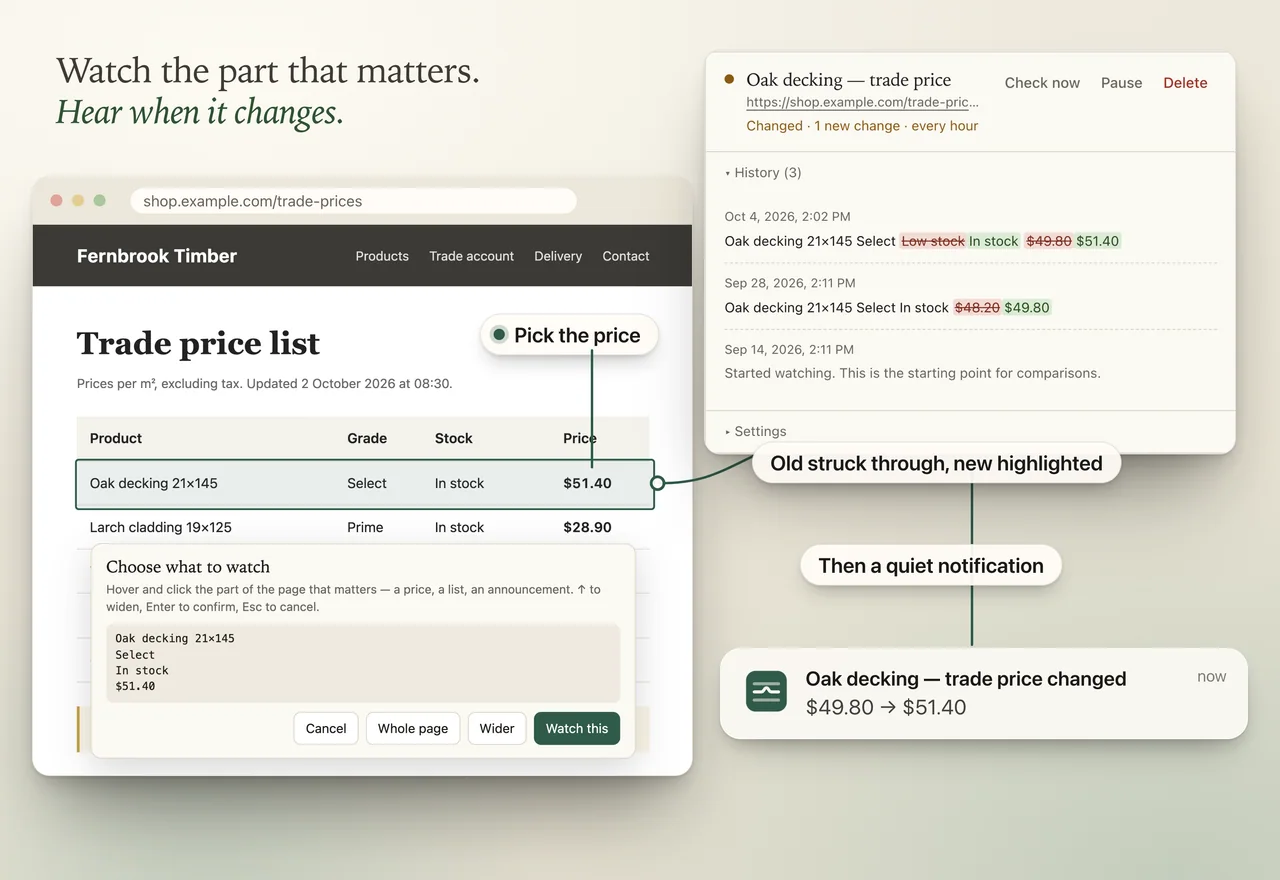
You keep going back to a page to see if the price, the stock level or the notice has changed. Stillwater, a Chrome extension, watches the part you pick and tells you when it changes. If it can’t check the page, it tells you that too.
Free for 3 monitors · Pro $39 once · No account
In review at the Chrome Web Store
See how it worksPro raises that to 50 monitors and checks as often as every 5 minutes. Checks run while Chrome is open.
01
How it works
- Pick exactly what to watchOpen the page, choose “Watch something on this page” and click the part you care about. Widen the selection with one key, or watch the whole page. Stillwater only looks at that part.
- Fewer false alarmsDates, times and “5 minutes ago” are ignored by default; switch date ignoring off for a monitor when a deadline is the thing you’re watching. A change must appear on two checks in a row before you’re alerted, which helps cut alerts from half-loaded pages and brief flickers.
- It tells you when it can’t checkIf a page errors, is redesigned so your part disappears, or access is lost, the monitor turns red, the toolbar shows “!”, and you get one notification. Stillwater keeps retrying and tells you when it’s working again.
- See exactly what changedEvery change is kept with a clear before and after: removed text struck through, new text highlighted.
- Pages that fill in after they loadOn the first check, Stillwater makes sure it sees what you picked. If the page fills in that part after it loads, it switches to opening the page briefly in a background tab, and tells you.


02
Free, or Pro for $39 once
- Free3 monitors (each one is a part of a page you watch), checked up to hourly, 20 history entries each. Every alert and failure warning included.
- Pro · $39 once50 monitors, checks as often as every 5 minutes, rules to ignore numbers, capitalisation and your own patterns, 200 history entries each and CSV export. One payment. Nothing renews. Your licence code works offline.
- 30-day refundIf Pro isn’t right for you, ask within 30 days of buying and you’ll be refunded. Lost your licence code? Recover it here, or email hello@kehrandco.com.
03
Private by design
- Runs on your computerChecks run from your browser while Chrome is open. Nothing you watch is sent to us; we have no server that could receive it.
- One site at a timeChrome asks you to allow Stillwater for each site, only when you choose to watch it. Quick checks are sent without your cookies.
- No account, no trackingNo analytics, no ads, no remote code. Back up or erase everything from settings at any time.
Read the full Stillwater privacy policy. Questions: hello@kehrandco.com.
04
Good to know
Does it check when Chrome is closed?
No. Checks run while Chrome is open. If your computer was asleep, Stillwater catches up when it wakes.
Can it watch pages behind a login?
Stillwater is built for public pages. It doesn’t log in to sites or solve CAPTCHAs.
Will it email me?
No. Alerts are Chrome notifications and a badge on the toolbar icon.
Need help? Email Stillwater support.
Guides: monitor a website for changes in Chrome · get alerted when a price changes.